Programming & Software course
Verilog HDL Fundamentals
Model, simulate, and design basic digital logic circuits using Verilog HDL and testbenches.
12 lessonsabout 80 minutes in allBeginnerFree
Lessons of 5 to 10 minutes, taught by Milo, your AI tutor. In your browser now; phone apps soon.
By the end you can
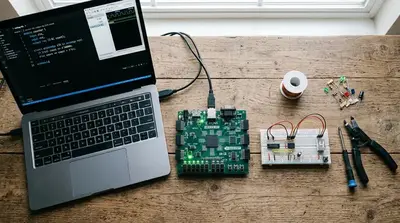
- Write basic modules that model combinational and clocked digital logic, including multiplexers, registers, resets, and a one-bit output controller
- Create testbenches, simulate designs with Icarus Verilog, inspect waveforms in GTKWave, and distinguish synthesizable constructs from simulation-only code
What you'll learn, lesson by lesson
- 1Binary Signals, Gates, and Truth TablesIdentify logic 0 and 1 values in simple digital signal examples.
- 2Verilog HDL: A Model of Hardware, Not a Circuit BoardDefine Verilog HDL as text that models digital hardware, not a circuit board or CPU program.
- 3Why Verilog Is Not Software ProgrammingDifferentiate parallel hardware behavior from sequential CPU instructions.
- That's a preview. 9 more lessons follow.
Take all 12 lessons free in the Milo app, with Milo teaching each one.
Start this course free - 4Modules, Ports, and Nets
- 5Continuous assign Statements and Logic Operators
- 6Combinational always @* Blocks
- 7if, else, and case: Describing a Multiplexer
- 8Testbenches and Waveforms with Icarus Verilog and GTKWave
- 9Clocks, Registers, and Nonblocking Assignments
- 10Resetting a Register Safely
- 11Simulation Versus Synthesis: What Hardware Can Be Built
- 12Capstone: A Clocked GPIO-Style Output Controller
Inside the app
Not a video. A tutor who teaches you.
Milo explains each idea of Verilog HDL Fundamentals out loud and on the blackboard, checks you understood, and coaches you when you slip. Lessons take 5 to 10 minutes.
Start free

More in Programming & Software
See all

Free to learn
This course is free. So is Milo's help planning it.
Every course in Milo's library, your growth plan and Milo's weekly check-ins cost nothing. Members, from $5 a month, also get lessons written just for them.
- Can I really start for free?
- Yes. No card needed.
- Can I cancel a membership any time?
- Yes, from your account. You keep it until the end of the month you paid for.
- Where does it work?
- In any browser on a phone, tablet or computer. Phone apps are on the way.